
Introduction
AWS App Runner makes it incredibly easy to deploy and scale web applications directly from your code repository or container image — no infrastructure management required. It’s a great fit for developers who want simplicity without giving up the power of AWS.
But things start to get tricky when you want to securely connect App Runner to other AWS services inside a private VPC — especially when you need to expose your backend through Amazon API Gateway.
By default, App Runner services are public-facing, and API Gateway communicates over the internet. While that works fine for basic setups, production environments often demand private connectivity, where all traffic stays within AWS’s internal network for security, compliance, or performance reasons.
In this guide, we’ll go beyond the usual public setup and walk through how to:
- Connect Amazon API Gateway to your App Runner service through a private network path.
- Use VPC Link, Network Load Balancer (NLB), and App Runner VPC Endpoint to securely route traffic.
- Avoid common networking pitfalls around subnets, DNS, and permissions.
- Build a scalable, secure architecture suitable for production environments.
By the end of this post, you’ll have a working, private integration between API Gateway and App Runner — a clean, secure pattern that combines the simplicity of App Runner with the control and power of AWS networking.
Understanding the Architecture
Before jumping into the implementation, it’s important to understand how each AWS service fits together in this design.
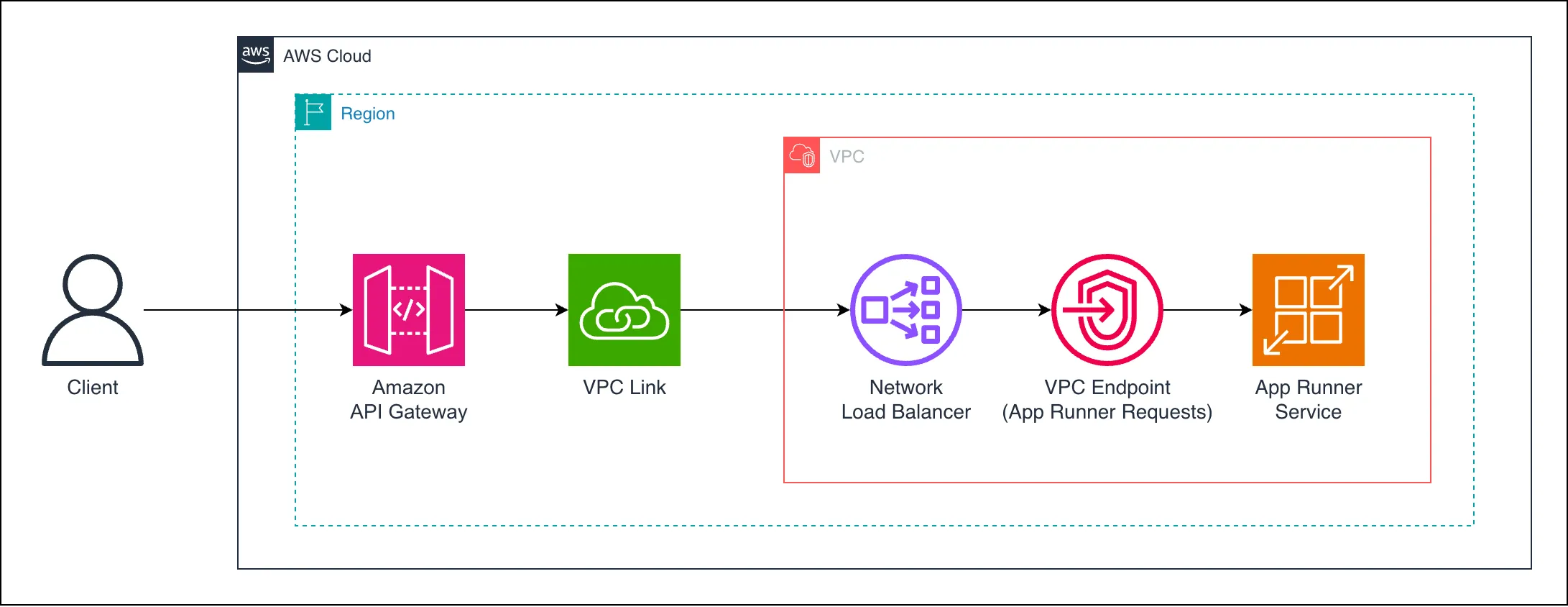 Figure 1: Private integration between Amazon API Gateway and AWS App Runner using VPC Link, NLB, and App Runner VPC Endpoint.
The request flow works as follows:
Client → API Gateway The client sends an HTTP request to the API Gateway endpoint. This can be a public endpoint (secured with authentication) or a private API within your organization.
API Gateway → VPC Link API Gateway uses a VPC Link to establish a private connection to resources inside your VPC. This avoids exposing your backend to the internet.
VPC Link → Network Load Balancer (NLB) The VPC Link routes requests to a Network Load Balancer, which acts as the bridge between API Gateway and internal services. The NLB is required because VPC Link integrations must target a load balancer rather than an EC2 instance or endpoint directly.
NLB → App Runner VPC Endpoint The NLB forwards traffic to the App Runner VPC Endpoint — a private endpoint that connects your VPC to your App Runner service securely.
App Runner VPC Endpoint → App Runner Service Finally, the traffic reaches your App Runner service running inside AWS’s managed environment. Since all components are privately connected, there’s no public internet exposure at any stage.
This design ensures that your API Gateway communicates privately with App Runner, maintaining full control over inbound and outbound traffic. It’s a clean and secure pattern ideal for production workloads, regulated environments, or internal APIs.
The Challenge
When working with AWS App Runner, one of its biggest strengths — simplicity — can also become a limitation once you step into more advanced architectures.
By default, every App Runner service exposes a public endpoint, and any client or service can reach it over the internet (unless restricted via IAM or custom authentication). That’s fine for simple apps or prototypes, but in most production setups, you need your backend to:
- Communicate only within a private AWS network
- Be accessible only through controlled entry points (like API Gateway)
- Avoid public exposure for compliance or security reasons
This is where the challenge begins.
API Gateway cannot directly integrate with App Runner over private connectivity. Unlike services such as ECS or Lambda, there’s no built-in “private integration” option. Even though App Runner now supports VPC Endpoints, these endpoints can’t be called directly by API Gateway — they must be reached through a VPC Link, which in turn requires a Network Load Balancer (NLB) as a target.
So the main puzzle looks like this:
How can we connect API Gateway to a private App Runner service, without exposing anything publicly, while keeping the setup clean and maintainable?
The answer lies in chaining the components together:
API Gateway → VPC Link → Network Load Balancer (NLB) → App Runner VPC Endpoint → App Runner Service
Each layer serves a specific purpose in keeping the communication private, scalable, and secure.
In the next section, we’ll walk through how to implement this step by step using AWS CDK Python, highlighting key configurations along the way — and link to a complete example repository for you to explore.
The Solution — Connecting API Gateway and App Runner Privately
Now that we understand the architecture and the networking challenge, let’s look at how to bring everything together. We’ll use AWS CDK Python to provision all components, following the secure flow:
API Gateway → VPC Link → Network Load Balancer (NLB) → App Runner VPC Endpoint → App Runner Service Each layer plays a distinct role in ensuring private communication inside your AWS environment.
1. Create the VPC, Security Group, and App Runner VPC Endpoint
Start by creating a VPC with private subnets and a security group that allows traffic between the Network Load Balancer (NLB) and the App Runner VPC Endpoint. Next, set up the App Runner VPC Endpoint to enable private connectivity between your VPC and the App Runner service — this ensures all communication stays internal, without exposing traffic to the public internet.
vpc = ec2.Vpc(
    self, "VPCId",
    vpc_name="my-vpc",
    subnet_configuration=[
        ec2.SubnetConfiguration(
            name="my-private-subnet",
            subnet_type=ec2.SubnetType.PRIVATE_WITH_EGRESS,
            cidr_mask=24,
        )
    ],
    nat_gateways=0 # We don't need the NAT gateway
)

security_group = ec2.SecurityGroup(
    self, "SecurityGroupId",
    security_group_name="security-group",
    vpc=vpc,
    allow_all_outbound=True,
)

security_group.add_ingress_rule(
    peer=security_group,
    connection=ec2.Port.all_traffic(),
    description="Allow all traffic within the security group"
)

vpc_apprunner_requests_endpoint = ec2.InterfaceVpcEndpoint(
    self, "AppRunnerRequestsEndpointId",
    vpc=vpc,
    service=ec2.InterfaceVpcEndpointAwsService.APP_RUNNER_REQUESTS,
    subnets=ec2.SubnetSelection(subnet_type=ec2.SubnetType.PRIVATE_WITH_EGRESS),
    security_groups=[security_group],
    private_dns_enabled=False,
)
2. Create the Network Load Balancer
With the App Runner VPC Endpoint in place, the next step is to create a Network Load Balancer (NLB) inside your VPC which will be used connect to API Gateway via a VPC Link.
Since App Runner VPC Endpoints use dynamically assigned ENIs, the NLB target group must resolve the private IP addresses of these interfaces. This ensures that traffic from API Gateway reaches the App Runner service securely and privately.
Key points to keep in mind:
- The NLB target group will point to the App Runner VPC Endpoint network interfaces IP addresses.
- Use TCP protocol for the target group, since App Runner listens for HTTP traffic internally.
- Ensure security groups and subnet configurations allow traffic from the NLB to the App Runner service.
Here’s a concise AWS CDK snippet showing the setup:
eni_ipaddress_resolver = EniIpAddressResolver(
    self, "EniIpAddressResolverId",
    network_interface_ids=vpc_apprunner_requests_endpoint_eni_ids
)
app_runner_vpc_endpoint_ips = eni_ipaddress_resolver.get_ip_addresses()

nlb_apprunner = elbv2.NetworkLoadBalancer(
    self, "NLBAppRunnerId",
    load_balancer_name="nlb-app-runner",
    vpc=vpc,
    vpc_subnets=ec2.SubnetSelection(
        subnet_type=ec2.SubnetType.PRIVATE_WITH_EGRESS
    ),
    security_groups=[security_group],
    internet_facing=False,
    cross_zone_enabled=True,
    enforce_security_group_inbound_rules_on_private_link_traffic=False,
)

nlb_network_group = elbv2.NetworkTargetGroup(
    self, "NLBAppRunnerTargetGroupId",
    target_group_name="my-nlb-app-runner-tg",
    vpc=vpc,
    port=443,
    protocol=elbv2.Protocol.TCP,
    target_type=elbv2.TargetType.IP,
    targets=[elbv2targets.IpTarget(
        ip) for ip in app_runner_vpc_endpoint_ips]
)

nlb_listener = nlb_apprunner.add_listener(
    "NLBAppRunnerListenerId",
    default_target_groups=[nlb_network_group],
    port=443,
    protocol=elbv2.Protocol.TCP
)
💡 Note: The
app_runner_vpc_endpoint_ipsshould be dynamically resolved from the ENIs of your App Runner VPC Endpoint. The AWS CDK code for classEniIpAddressResolverin the example GitHub repo handles this automatically.
This setup allows API Gateway to route requests through the VPC Link → NLB → App Runner VPC Endpoint → App Runner service, keeping all traffic within the private network.
3. Configure App Runner Service in a VPC
Once your VPC and NLB are ready, it’s time to configure the App Runner service to run inside your private network.
Key steps:
- Attach the VPC Connector
- Ensure your App Runner service uses a VPC Connector pointing to the private subnets of your VPC.
- This allows the service to receive traffic through the NLB and communicate privately with other resources in the VPC.
- Associate Security Groups
- Use a security group that allows inbound traffic from the NLB and outbound traffic to any other required resources (databases, internal APIs, etc.).
- Private DNS and Networking
- App Runner services inside a VPC use private DNS names and ENIs, which are automatically resolved when registering with the NLB target group.
- Create the VPC Ingress Connection
- The VPC Ingress Connection is required for API Gateway or NLB to send traffic to a private App Runner service.
- It establishes the secure link between the App Runner service and your VPC.
Here’s a concise CDK snippet illustrating the setup:
apprunner_vpc_connector = apprunner.CfnVpcConnector(
    self, "AppRunnerVpcConnectorId",
    vpc_connector_name="my-arvpcconn",
    subnets=vpc_subnet_ids,
    security_groups=security_group_ids,
)

apprunner_backend_api_service = apprunner.CfnService(
    self, "AppRunnerBackendAPIServiceId",
    source_configuration=apprunner.CfnService.SourceConfigurationProperty(
        authentication_configuration=apprunner.CfnService.AuthenticationConfigurationProperty(
            access_role_arn=app_runner_role.role_arn
        ),
        image_repository=apprunner.CfnService.ImageRepositoryProperty(
            image_identifier="my-app-image:latest",
            image_repository_type="ECR"
        )
    ),
    network_configuration=apprunner.CfnService.NetworkConfigurationProperty(
        ingress_configuration=apprunner.CfnService.IngressConfigurationProperty(
            is_publicly_accessible=False
        ),
        egress_configuration=apprunner.CfnService.EgressConfigurationProperty(
            egress_type="VPC",
            vpc_connector_arn=apprunner_vpc_connector.attr_vpc_connector_arn
        ),
    ),
    health_check_configuration=apprunner.CfnService.HealthCheckConfigurationProperty(
        path="/",
    ),
)

apprunner_vpc_ingress_connection = apprunner.CfnVpcIngressConnection(
    self,
    "AppRunnerVpcIngressConnectionId",
    vpc_ingress_connection_name="my-arvpcincon",
    service_arn=apprunner_backend_api_service.attr_service_arn,
    ingress_vpc_configuration=apprunner.CfnVpcIngressConnection.IngressVpcConfigurationProperty(
        vpc_id=vpc.vpc_id,
        vpc_endpoint_id=vpc_apprunner_requests_endpoint.vpc_endpoint_id
    )
)
💡 Tip: Your App Runner service now has full private connectivity, enabling API Gateway to route requests securely via the NLB and VPC Link.
4. Configure API Gateway Private Integration
With the App Runner service fully private and connected to the VPC via the VPC Connector and VPC Ingress Connection, the final piece is to configure API Gateway so that it can securely route requests to your backend.
- Create a VPC Link
- The VPC Link connects API Gateway to your Network Load Balancer (NLB) inside the private VPC.
- API Gateway uses this link to send traffic over the private network rather than the public internet.
- Configure API Gateway Routes
- Define the routes or methods for your API.
- Each route uses the existing VPC Link to forward requests to the NLB, which then reaches the App Runner service.
- Security and Access
- Optionally, add authorization (Cognito, IAM, or Lambda authorizers) to your API Gateway endpoints.
- Ensure security group rules allow traffic from the NLB to the App Runner service.
Here’s a concise CDK snippet showing the integration:
vpc_link = apigateway.VpcLink(
    self, "ApiGatwayVpcLinkId",
    description="VPC Link for App Runner NLB",
    vpc_link_name="my-nlb-vpc-link",
    targets=[nlb_apprunner]
)

apigateway_restapi = apigateway.RestApi(
    self, "ApiGatwayOpdRestApiId",
    ...
)

apprunner_integration = apigateway.Integration(
    type=apigateway.IntegrationType.HTTP_PROXY,
    integration_http_method="ANY",
    options=apigateway.IntegrationOptions(
        connection_type=apigateway.ConnectionType.VPC_LINK,
        vpc_link=vpc_link,
        passthrough_behavior=apigateway.PassthroughBehavior.WHEN_NO_MATCH,
        request_parameters={
            "integration.request.path.proxy": "method.request.path.proxy"
        },
    ),
    uri=f"https://{apprunner_vpc_ingress_connection.attr_domain_name}" + "/{proxy}",
)

restapi_apprunner_app_resource = apigateway_restapi.root.add_proxy(
    any_method=True,
    default_integration=apprunner_integration,
    default_method_options=apigateway.MethodOptions(
        api_key_required=True, # As its enabled you need to setup the key separately
        request_parameters={
            "method.request.path.proxy": True
        },
    )
)
⚠️ Important
These request_parameters are crucial for proxy integrations to work correctly:
"integration.request.path.proxy": "method.request.path.proxy"ensures the path is correctly forwarded from API Gateway to the NLB."method.request.path.proxy": True enables the API Gateway route to accept any path parameter dynamically.
Missing these will cause the proxy route to fail or return 403/404 errors.
This ensures that your App Runner backend is fully private, with requests securely routed through API Gateway without exposing anything publicly. All traffic now flows privately through: Client → API Gateway → NLB → App Runner VPC Endpoint → App Runner Service
Common Pitfalls & Troubleshooting
Even with a clear architecture, integrating API Gateway with App Runner in a private VPC can be tricky. Here are the most common issues and tips to avoid them:
- ENI IP Address Resolution
- App Runner VPC Endpoints use dynamically assigned network interfaces (ENIs).
- The Network Load Balancer must register these IPs as targets.
- ✅ Tip: Use the CDK or your IaC tool to automatically fetch and register the ENI IPs; manually using static IPs can break if App Runner scales or changes.
- Security Groups and Subnet Configuration
- Ensure security groups allow:
- NLB → App Runner VPC Endpoint traffic (inbound)
- App Runner → other required services (outbound)
- Private subnets must have route tables allowing internal communication between NLB and App Runner.
- 🔹 Common mistake: forgetting inbound rules for the NLB → App Runner path.
- Ensure security groups allow:
- API Gateway Proxy Integration Parameters
As highlighted earlier, these
request_parametersare critical:"integration.request.path.proxy": "method.request.path.proxy" "method.request.path.proxy": TrueMissing or misconfigured parameters can cause 403, 404, or 502 errors. Always verify them in your code.
- DNS and Private Connectivity
- App Runner services in a VPC use private DNS.
- NLB target groups must resolve these private DNS names to ENI IP addresses.
- ❗ If DNS fails, traffic will not reach App Runner — double-check private DNS and subnet connectivity.
- Testing and Logging
- Use Postman, curl, or API Gateway test console to validate requests.
- Enable CloudWatch logs on API Gateway and App Runner for troubleshooting.
- Enable AWS X-Ray tracing for both API Gateway and App Runner Service to get end-to-end visibility of requests, latency, and potential bottlenecks.
- Confirm that traffic flows: Client → API Gateway → NLB → App Runner VPC Endpoint → App Runner Service
💡 Pro Tip: Most issues in private integration setups come from networking or security group misconfigurations, so verify your VPC, subnets, and SG rules before troubleshooting code.
Conclusion & Next Steps
In this guide, we explored how to set up Amazon API Gateway as a front door for an AWS App Runner service in a private VPC. By combining VPC Links, Network Load Balancer, and App Runner VPC Endpoints, we achieved a secure, fully private integration that keeps all traffic inside your AWS network.
Key Takeaways
- App Runner services can now operate privately, avoiding public exposure.
- API Gateway VPC Links enable private connectivity to internal resources like NLB and App Runner endpoints.
- Proper configuration of security groups, subnets, and proxy integration parameters is critical for a working setup.
- AWS CDK (or other IaC tools) simplifies provisioning and dynamically resolves App Runner ENI IP addresses.
- AWS X-Ray (if enabled) and CloudWatch logs help trace requests end-to-end and troubleshoot networking issues.
Next Steps
- Explore authorization options on API Gateway (Cognito, IAM, or Lambda authorizers) to control access to your private backend.
- 🔹 Tip: You can refer to my previous blog on Lambda@Edge with Amazon Cognito for detailed guidance on integrating authentication and JWT validation:
- [🔗 Step-by-Step Guide: Setting Up Lambda@Edge for Authentication & Authorization with Amazon Cognito]
- 🔹 Tip: You can refer to my previous blog on Lambda@Edge with Amazon Cognito for detailed guidance on integrating authentication and JWT validation:
- Automate deployment using CI/CD pipelines for reproducible setups.
- Experiment with scaling App Runner services while maintaining private integration.
- Check out the example repository for the full AWS CDK Python implementation: 🔗 GitHub Example Repo Link
- Comment on below if you’d like a Terraform version of this setup!
This architecture provides a secure, scalable, and maintainable pattern for exposing App Runner services through API Gateway without public internet exposure — ideal for internal APIs, regulated environments, or production workloads.
References
The following resources provided valuable insights and context for this guide, covering AWS App Runner, API Gateway private integrations, VPC connectivity:
- https://www.youtube.com/watch?v=H5OKe8jXnX0
- https://repost.aws/knowledge-center/api-gateway-500-error-vpc
- https://docs.aws.amazon.com/elasticloadbalancing/latest/network/load-balancer-security-groups.html
- https://aws.amazon.com/blogs/compute/understanding-vpc-links-in-amazon-api-gateway-private-integrations/